

The term’ dirty data’ is used a lot in business, but what exactly is it? Well, the truth is that it can mean different things to different people, depending on the types of data they work with. But at its most basic level, dirty data is anything incorrect.
What does that look like in the real world? Read on, and in the next 1,000 words or so, you’ll find out.
What is dirty data?
Dirty data is data that is incomplete, inaccurate, inconsistent, duplicated, or outdated, making it unreliable for reporting, decision-making, automation, and AI. Some of the most common types are as follows:
Misspelt names or typos
This happens more than you think. If it’s supplier names, it could be a simple switch of letters, e.g., ‘ABC Printing’ to ‘ABC Printign’. It could be a missing letter, such as ‘T Shoemit’ instead of ‘T Shoesmith’. Or it may be more subtle, like AT Jones, instead of TA Jones – the kind of error that’s easy to miss.
If you’re dealing with personal information, it’s doubly important to get the name right because of data protection regulations such as GDPR. Here’s a real-life example from Susan’s own experience:
“When I first set up my limited company, ‘The Classification Guru Ltd’, I received a piece of mail with the correct address and correct first and middle names. However, it had someone else’s surname and a business name that wasn’t mine.
When I checked on Companies House, I could see that the surname and the business name were related to one person – everything else was my information. I suspect one of three things happened:
- The mailing list was in Excel, and because someone hadn’t filtered all the columns, the information got mixed up.
- Someone removed a few lines of data, causing information in certain columns to shift and misalign.
- Or, it could have been something as simple as a cut and paste error.
Whatever the cause, it could easily have been rectified by applying spot checks to the data before using it as a mailing list.”
Incorrect or misleading descriptions
This comes up a lot in invoice or PO descriptions. It could be something as simple as ‘services’ in the description, and the person’s name as the supplier. Well, who are they? The copywriter, the lawyer, another consultant of some sort? It can be very tricky to clarify this detail, and so it often ends up classified under ‘Professional Services’. But what if it’s actually plumbing or electrical services, and should sit under ‘Facilities’? It might look like a small value, but what if the reality is that there’s a large amount of spend being incorrectly accounted for?
Misleading spend data descriptions can happen easily if you don’t view the data in context. For example, looking only at the information in the invoice or PO line description column, but not the supplier name. You might have ‘cleaning’ as a description, but with Dell or IBM as the supplier. This completely changes the context of the information from janitorial services to data or computer or data cleaning services.
Missing or incorrect codes
This can be a real issue in the manufacturing and supply chain industries. There are several reasons why a product code might be missing. If it’s an older product, it might not have been assigned a code originally. Or perhaps the code wasn’t available when the product was set up, and no one followed up to add it in once it was created.
There’s also the ‘can’t be bothered’ aspect. We don’t like to think about it, but some people just can’t be bothered to find the information they need. If they’re not being monitored and know they can get away with it, they’ll continue to set up products with missing information. This could be broader than just the product code; it could be dimensions and weights, which are critical to many areas of the business.
Incorrect codes are just as harmful. It could be that someone has mistyped a code, resulting in some numbers being mixed up, or a missing number or letter. Or it could be something more subtle, like replacing a zero with the letter O. These can result in duplicate records, the wrong items being ordered, shipped, manufactured or reported in inventory, etc., leading to unnecessary costs.
No standard address formats
We see this A LOT in both supplier and personal data, because there are many ways to record an address. Sometimes it’s all in one cell, sometimes it’s split over several columns. And then we’ve seen cities in the county or state column, or the postal or zip code in the city or county column.
Abbreviations add to the situation. Terrace could be Terr, Place – Plc, Road – Rd, Street – St… you get the picture. This can lead to near-duplicates, multiple records, and information split across records, resulting in incorrect information and reporting.
Not only is this messy, but it’s present in nearly every data set our team sees.
No standard units of measure
This can cause many dirty data issues, especially if you are trying to analyse or report on a specific product.
Even the little things matter. For example, whether you decide to include a space between the number and the unit of measure can cause near duplications. Being clear and specific with your team will help avoid multiple versions of the same items.
Currency issues
This has certainly caused issues for our team when trying to report values to match. If you are not aware that the values you are working with are in multiple currencies, you could spend hours trying to get the figures to match. It’s particularly confusing if you’re working with something like Swedish Krona versus GBP or USD; the values are significantly higher, so it could end up looking like you’ve spent £500 on a taxi…
Incorrect or partially classified spend data
For data cleaning professionals, this is worse than a complete absence of classified data. That’s why we always prefer to start from scratch rather than use data that a client has partially classified.
It might sound harsh, but they wouldn’t be using our services if there wasn’t an issue with their classified data. And, in terms of efficiency, it’s easier to start again with a clean slate, allowing our team to apply our own standards which we know will be consistent and accurate.
Duplicates
Aaah, the dreaded duplicates – a classic in the dirty data hall of fame.
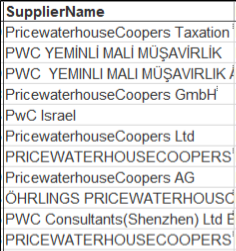
These can appear in many forms, from duplicate invoices or duplicate customer/supplier records, to orders, products and much, much more. They create multiple records, which could split the information, leaving you with only part of the picture. And then there are the near duplicates. In business, this could be PWC vs P.W.C; with personal information, it could be Robert Smith vs Bob Smith.
Why does dirty data matter?
Why does it matter if your data has some of these issues? Will anyone really notice?
Well, like any problem, it’s manageable when it’s small, but if it goes unnoticed or is left to fester, it can become a significant issue.
What if your car started making a rattling noise? And then the ‘check engine’ light came on? You wouldn’t leave that to deteriorate, would you? You definitely wouldn’t go on a long road trip and risk being stranded in the middle of nowhere. In the same way, you shouldn’t be making big business decisions based on unclassified, poor-quality data.
How to clean your dirty data
Sadly, there’s no quick fix, magic button, or special software that can magically fix your data. No, not even AI. But there are several ways that the Classification Guru team can help.
Our data cleaning service tidies up your data so you and your team save time and costs, and you know you’re using the correct data, every time. And if you want to standardise your company names quickly and accurately, Samification is the perfect tool.
If, instead, you’d like to upskill yourself or your team, Susan’s book, ‘Between the Spreadsheets: Classifying and Fixing Dirty Data’, contains everything you need to tidy up your data yourselves. Buy it here and get 20% off when you use the code NEW20.

Found this article useful? Read this one next – What is tail spend?
